

 Tiếng Việt
Troubleshooting
Did you just download GTA San Andreas to relive the classic journey, only to find it won’t launch? Are you experiencing random crashes during intense missions, or is your mouse frozen, preventing you from looking around?
At the Troubleshooting section of GTA San – gtasan.org, we understand that running a 2004 legend on modern systems like Windows 10 and Windows 11 can be a challenge. That is why Nhat Truong has extensively researched and compiled the most effective technical solutions to get your game running perfectly again.
Core Issues Fixed by Nhat Truong
- DirectX 9.0 & Startup Errors: Comprehensive guides on enabling “Legacy Components” and installing DirectX files to bypass the “DirectX version 9.0 required” error on Win 10/11.
- Fixing ‘Crash to Desktop’ (CTD): Permanent solutions to eliminate annoying random crashes, ensuring CJ’s journey in Los Santos remains uninterrupted.
- Successful Mouse Lag & Freeze Fix: A 100% working fix for the frozen cursor and unresponsive clicking—the most common issue when playing GTA San on modern PCs.
- Resolution & Widescreen Scaling: Tutorials on fixing stretched UI, blurry fonts, and aspect ratio issues to make the game look stunning on 1080p and 4K monitors.
- System Compatibility & FPS Optimization: How to tweak Compatibility Mode and manage the “Frame Limiter” to prevent game physics glitches caused by high frame rates.
Expert Troubleshooting Guides by Nhat Truong
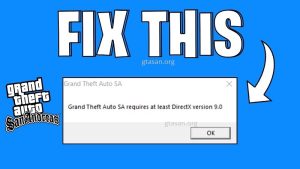
GTA San Andreas DirectX 9.0 Fix: Windows 10/11 Guide
11/02/2026
Bởi
Nhật Trường - game thủ GTA San
When installing the game on modern operating systems like Windows 10 or Windows 11, many...