Tiếng Việt
Correctly extracting GTA San Andreas is the most critical step to ensure a stable, error-free gaming experience. Incorrect extraction often leads to missing files or startup crashes. Below is the verified guide for both PC and Android, tested and shared by Nhat Truong – a dedicated GTA San gamer.
Technical Overview
Use this table to quickly identify the tools and information needed for the extraction process.
| Feature | PC Version (Windows) | Android Version (Mobile) |
|---|---|---|
| File Format | .rar or .zip | .apk and .zip (Data/OBB) |
| Tools | WinRAR, 7-Zip | ZArchiver, Files by Google |
| Password | gtasan.org number 1 | gtasan.org number 1 |
How to Extract GTA San Andreas on PC
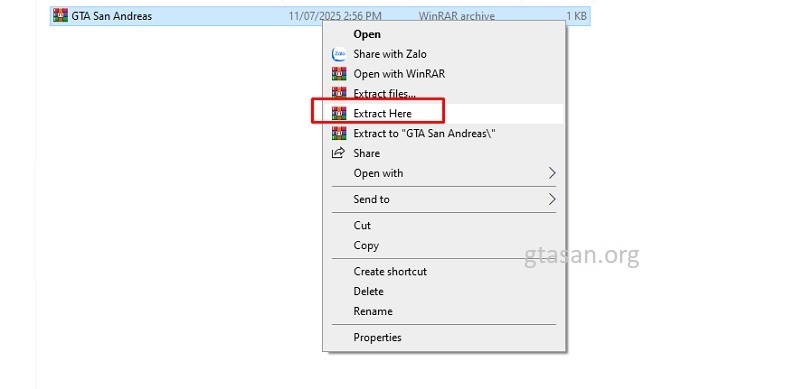
For PC, WinRAR is the most reliable tool. Follow these quick steps:
- Locate File: Open the folder where you downloaded the game (usually the “Downloads” folder).
- Extract: Right-click the file and select “Extract Here”. If it’s a double-compressed file, perform this twice.
- Enter Password: When prompted, type: gtasan.org number 1 (ensure no extra spaces).
- Verify: Once completed, you will see a new folder containing the full game data.
Read more: Detailed Installation Guide for GTA San Andreas PC
How to Extract GTA San Andreas on Android
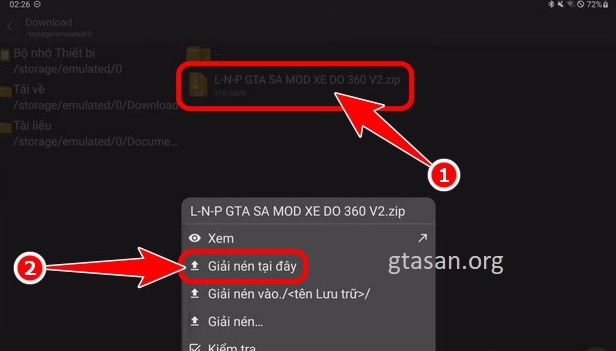
On mobile, I highly recommend using ZArchiver for professional file management.
- Open ZArchiver: Navigate to your download directory.
- Extract Data/OBB: Tap on the compressed file and select “Extract Here”.
- Password Authentication: Enter gtasan.org number 1 when the password prompt appears.
- Locate Folder: After extraction, you will see the com.rockstargames.gtasa folder. Keep this folder to move into your system’s OBB directory later.
Read more: Step-by-step GTA San Andreas APK Installation for Mobile
Important Troubleshooting Tips
Based on my technical experience at gtasan.org, please keep these two points in mind:
- Password Errors: Copy and paste the password directly to avoid typos or accidental capitalization. The password is always provided with the download file.
- Corrupted Files: If extraction fails midway, the file was likely corrupted during download. Delete the file and re-download it to ensure data integrity.
Successful extraction is the foundation of a smooth, lag-free game. If you encounter any password or file issues, leave a comment below for direct support from Nhat Truong.